


Paychex Flex
4.511.13K Reviews
App Specs
- Version
- 7.76.0
- Updated On
- License
- Free
- Downloads
- 5,000,000+
- Developer
- Paychex, Inc
- Categories
- Business
- Platform
- Android, iOS
Screenshots
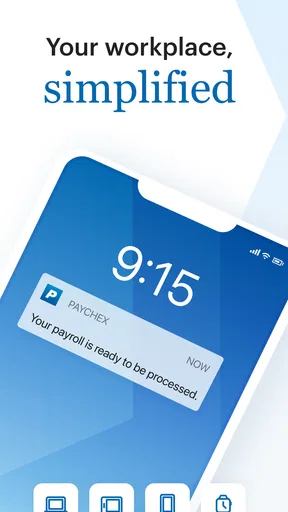
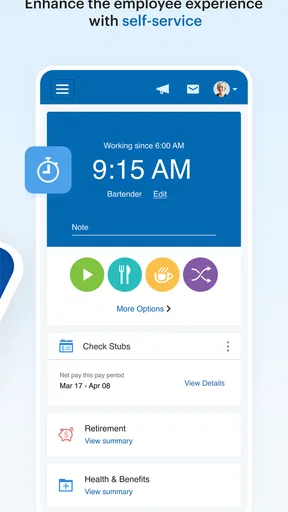
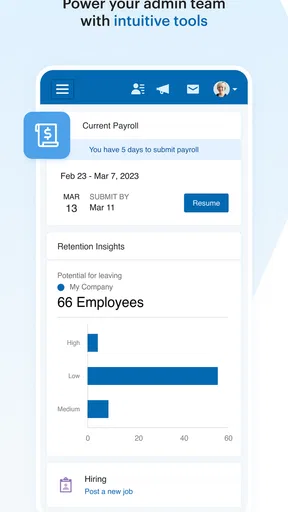
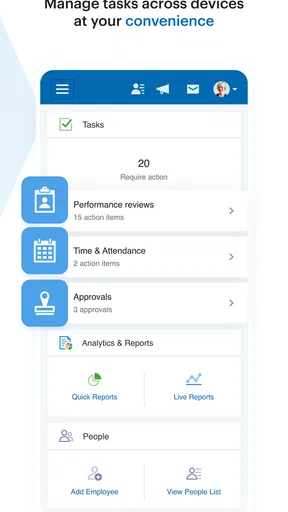
 Analysis by AppCompare
I look at Paychex Flex less as a general-purpose business app and more as a mobile companion for people whose workplace already uses Paychex for payroll or HR. That distinction matters: the app is most useful when your employer has set up the services behind it, rather than as a standalone way to choose and run a complete HR system. If you are deciding whether it belongs on your phone, start with what your company actually manages through Paychex and what you need to do away from a desk.
Start with the job you need it to do
For an employee, the practical question is whether routine work-related tasks are easier to handle on a phone than by contacting a manager or signing in elsewhere. For an employer or administrator, the question is whether mobile access fits into an established payroll and HR process. The app is in the business category, is developed by Paychex, Inc, and is free to download. Its usefulness still depends on your role and the services your organization has arranged; installing it alone does not make it a substitute for those arrangements.
I would check with the person who handles payroll or HR before relying on it. Ask which tasks employees are expected to do in the app, whether managers use it for approvals or attendance, and where to go if something looks wrong. This simple check can prevent a common frustration: downloading a workplace app, signing in, and finding that the relevant part of the service has not been set up for your organization.
How it fits into an ordinary workday
Imagine you are heading home after a shift and want to check a work-related detail without waiting until you are back at a computer. A mobile HR companion can make that sort of small task less disruptive, especially when a business already uses the related Paychex services. The advantage is not that every employment question disappears into a phone; it is that some routine information and actions may be closer at hand. For anything affecting pay or an employee record, I would still review the details carefully and ask the appropriate workplace contact when something does not look right.
That distinction is useful for managers, too. A phone can help with quick checks while away from a desk, but it is not automatically the best place to handle every administrative decision. I would treat mobile access as a way to stay connected to an existing process, not as a reason to skip the business’s normal review and approval steps. Payroll deserves that extra care: a convenient interface does not remove the need to verify entries before they are finalized.
Your All-in-One HR Solution
First off, let's talk about what makes Paychex Flex stand out in the crowded marketplace of HR apps. It's designed to cater to businesses of all sizes, from startups to established enterprises. The app provides a comprehensive suite of services, including payroll processing, benefits administration, and even time and attendance tracking. It's the Swiss army knife of HR tools, and the best part? You can access it all on the go.
Intuitive User Experience
The first thing you'll notice upon downloading is the sleek, intuitive interface. Whether you're tech-savvy or a newbie, navigating through the app is a breeze. The dashboard is organized and user-friendly, offering quick access to critical features. Need to run payroll? A few taps, and you're set. Want to check your team's attendance? It's all right there, no fuss.
Worth Reading Before You Choose

EA SPORTS FC Mobile 26 Is a Bigger Football Game, but It Takes Time

Flipboard Shows What News Apps Must Do Beyond the Feed

Switching to Android Auto Means Rethinking Your Driving Routine

Google Calendar Makes a Crowded Week Easier to Manage

Ludo King Makes the Most of the Minutes Between Plans

Baby Panda World Brings Quick Play to Modern Phones, but Its Game Library Feels Busy
Even with a straightforward layout, the most helpful way to approach a business app like this is to separate quick reference from consequential actions. I would use a phone for a fast check when time is tight, then take a moment to confirm important payroll or attendance details before submitting anything. That habit is especially sensible when several people share responsibility for entering or approving workplace information. Clear screens are useful, but they do not replace a careful review.
Payroll Made Effortless
Let's dive into payroll processing, the heart of any HR app. With Paychex Flex, you can process payroll in minutes, not hours. The app handles tax calculations, direct deposits, and even generates detailed reports. You can say goodbye to those sleepless nights worrying about payroll errors. Plus, the app ensures compliance with the latest tax laws, so you're always in the clear.
Payroll is also where I would be most cautious about assuming that a mobile workflow suits every business. A small operation with a familiar, repeatable routine may appreciate the ability to manage tasks on the move. A company with complex approvals or unusual pay arrangements may prefer to do its detailed checks in the normal administrative workflow and use the phone for supporting tasks. Before switching from another process, identify who checks hours, who reviews the final figures, and how corrections are handled; preserving those responsibilities is more important than saving a few taps.
Comprehensive Benefits Administration
If managing employee benefits feels like juggling flaming swords, this app's got your back. It offers an extensive benefits administration system that simplifies everything from health insurance to retirement plans. Employees can view and update their benefits information directly from the app, which means fewer headaches for you. It's all about making life easier, right?
For employees, a mobile route to benefits information can be convenient when a question comes up outside office hours, but I would not treat a quick glance as a substitute for reading the relevant plan details before making a consequential choice. For administrators, the useful trade-off is access versus context: a phone makes a task reachable, while a larger screen or a conversation with the benefits contact may be better for comparing options or resolving a specific eligibility question. The app is most valuable when it helps people reach the right step, not when it encourages rushed decisions.
Time and Attendance Tracking
Time tracking is another feature where this app shines. Employees can clock in and out with ease, and you can monitor attendance and manage schedules without breaking a sweat. The app even integrates with various time-tracking devices, making it versatile and adaptable to your specific needs. It's like having a watchful eye on your team's productivity, ensuring everyone is on the same page.
Here, the everyday benefit depends on having a clear workplace routine. If staff work different shifts or use a shared device at a job site, agree on the correct clock-in process and what to do if a record needs fixing before anyone depends on mobile entries. A manager reviewing attendance should distinguish a quick status check from a full reconciliation of hours. That small bit of process discipline can prevent a convenient tool from creating confusion about which record is authoritative.
Security and Support
When dealing with sensitive employee data, security is paramount, and Paychex Flex doesn't skimp on this front. The app uses advanced encryption technologies to keep your data safe and sound. Plus, if you ever hit a snag, their customer support is top-notch, ready to assist you with any issues. Peace of mind is just a call or click away.
Where another approach may suit you better
The usual alternatives fall into a few broad groups: handling HR through desktop-focused payroll software, using separate tools for individual tasks, or relying on a manual process supported by email and spreadsheets. I would not assume one approach is universally better. A business already organized around Paychex may find a connected mobile companion more practical than asking staff to learn a second system. Someone who only needs a narrow function, or whose employer uses a different provider, may find a dedicated tool or the existing workplace process simpler.
There is also a meaningful difference between an employee looking for access to workplace information and an owner choosing a platform for the whole company. Employees should first confirm that their employer uses the relevant Paychex services. Owners should compare the complete workflow they need, including who will administer it and how their team handles exceptions, rather than judging a business system only by its phone interface. I would skip this app as a personal productivity download if I had no connection to an organization using it; its value is tied to that work relationship.
What to settle before you switch
Changing payroll or HR routines has a real cost even when the app itself is free. People need to know where to find information, managers need to understand their responsibilities, and the business has to keep its records consistent during the change. Before moving a process, list the recurring tasks your staff actually perform, decide who owns each one, and test the new routine with a normal work cycle before relying on it for a deadline. This is more useful than asking only whether the interface looks easy.
For an employee, the first practical questions are whether the employer has enabled access, what sign-in method to use, and who can resolve a mismatch in pay, benefits, or attendance. For a business administrator, the key questions are which services are part of the organization’s setup and which actions should stay in an established approval process. I would get those answers from the workplace contact before treating the app as the source of truth for every issue. That avoids confusing app access with authorization to make a change.
The app has an average rating of 4.6 from around 76,000 ratings, and it has been installed over 5 million times. Those figures suggest that many people use it, but they cannot tell you whether your employer’s setup matches your needs. It is free and rated for Everyone, and the current version is 7.73.0, with Android 10 as its minimum operating system. I would use compatibility as a basic check, then make the decision based on your workplace’s actual Paychex workflow.
Final Thoughts
So, is Paychex Flex worth the download? Absolutely. It's a robust, reliable, and comprehensive HR app that streamlines business operations and saves you time. Whether you're a small business owner or managing a large team, this app is your trusty sidekick in the world of HR management. Give it a go, and prepare to be impressed.
Who I would recommend it to
I would recommend it to employees whose workplace uses Paychex and to administrators who want mobile access as part of an existing HR routine. It makes the most sense when the organization has already decided how payroll, benefits, and time records are handled and people need a convenient way to stay connected to those tasks. Paychex Flex was released on June 10, 2012, and its continued presence in the business-app space makes it a familiar option for people already within that ecosystem, though longevity alone should not decide whether it fits a particular company.
I would be more reserved if you are choosing software from scratch, need only one isolated feature, or expect a phone app to replace conversations with payroll and HR staff. In those cases, compare the overall process your organization needs, including how exceptions and corrections are managed. My recommendation is straightforward: install it when your employer points you to it or when your business is adopting the Paychex services it supports; otherwise, first confirm that it has a real role in your workday.
Pros
- User-friendly interface simplifies navigation.
- Comprehensive payroll management features.
- Secure data encryption ensures privacy.
- Real-time updates keep info current.
- Mobile access for on-the-go management.
Cons
- Limited integration with third-party apps.
- Occasional glitches in mobile version.
- Customer support can be slow at times.
- Complex setup for small businesses.
- Subscription costs can be high.
FAQs for Paychex Flex
What features does Paychex Flex offer for payroll management?
Paychex Flex provides a comprehensive suite of payroll management features, including automated payroll processing, tax filing, and compliance support. Users can easily manage employee information, track hours worked, and generate detailed payroll reports. Additionally, it offers direct deposit and mobile access, making payroll management convenient and efficient.
Is the Paychex Flex app secure for handling sensitive information?
Yes, Paychex Flex prioritizes security to protect your sensitive information. The app uses encryption, multi-factor authentication, and secure data centers to ensure that your data remains confidential and safe from unauthorized access. Regular security updates and compliance with industry standards further enhance its security measures.
Can small businesses benefit from using Paychex Flex?
Absolutely, small businesses can greatly benefit from Paychex Flex. The app is designed to accommodate businesses of all sizes, offering scalable solutions that grow with your company. It streamlines payroll, HR, and benefits administration, allowing small business owners to focus on strategic growth rather than administrative tasks.
Does Paychex Flex integrate with other business software?
Yes, Paychex Flex integrates seamlessly with various business software applications. This includes popular accounting and HR systems, enabling you to synchronize data across platforms. Such integration helps in reducing manual data entry, minimizing errors, and enhancing overall operational efficiency.
What kind of customer support does Paychex Flex offer?
Paychex Flex provides robust customer support, including 24/7 access to experienced representatives via phone, email, or live chat. Additionally, users can access a wealth of online resources, such as FAQs, tutorials, and community forums, to help resolve issues and maximize the app's potential.


